
package com.example.loans_domain.filter;

import jakarta.servlet.Filter;
import jakarta.servlet.FilterChain;
import jakarta.servlet.FilterConfig;
import jakarta.servlet.ServletException;
import jakarta.servlet.ServletRequest;
import jakarta.servlet.ServletResponse;
import jakarta.servlet.http.HttpServletRequest;
import jakarta.servlet.http.HttpServletResponse;
import org.springframework.security.authentication.BadCredentialsException;
import org.springframework.util.StringUtils;

import java.io.IOException;
import java.nio.charset.Charset;
import java.nio.charset.StandardCharsets;
import java.util.Base64;

import static org.springframework.http.HttpHeaders.AUTHORIZATION;

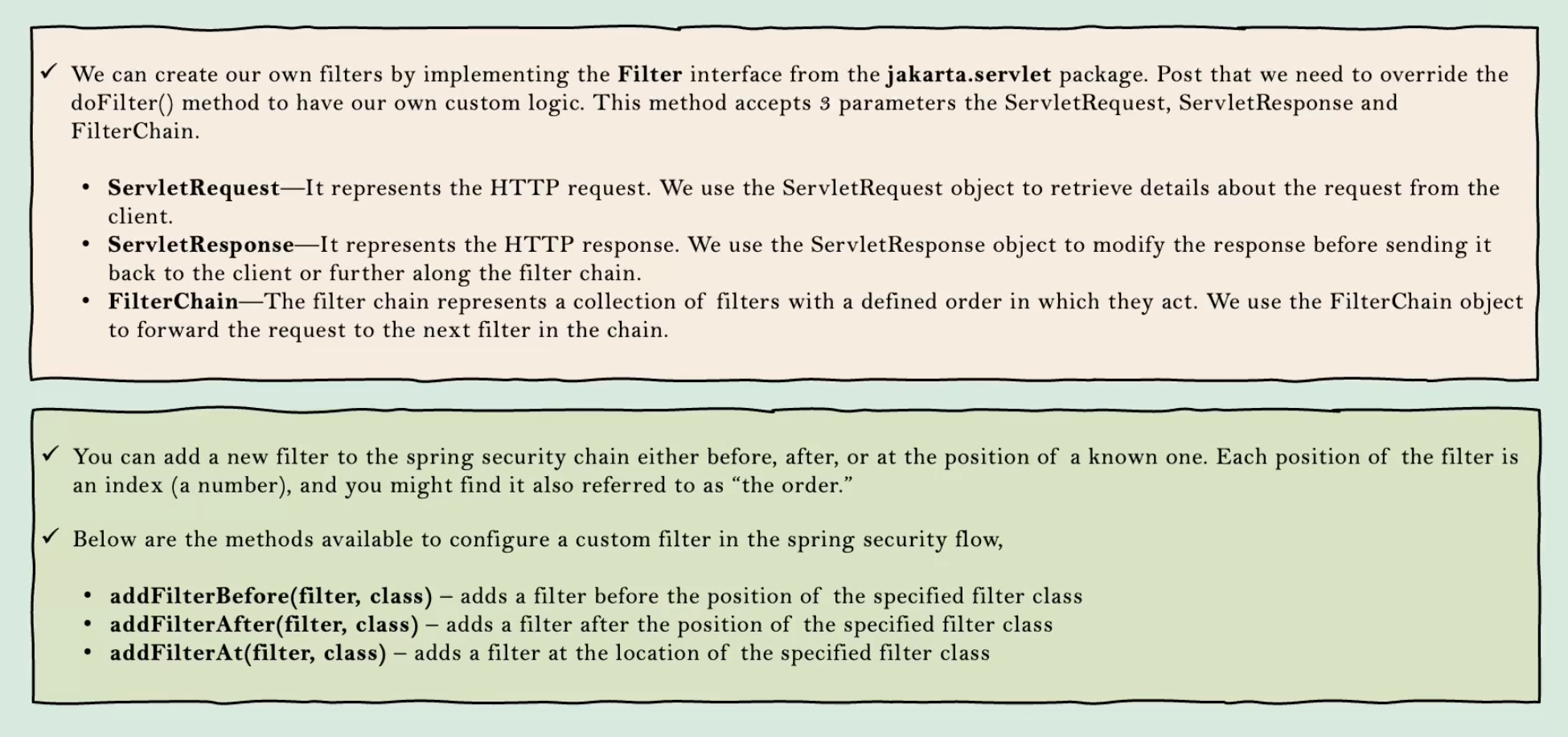
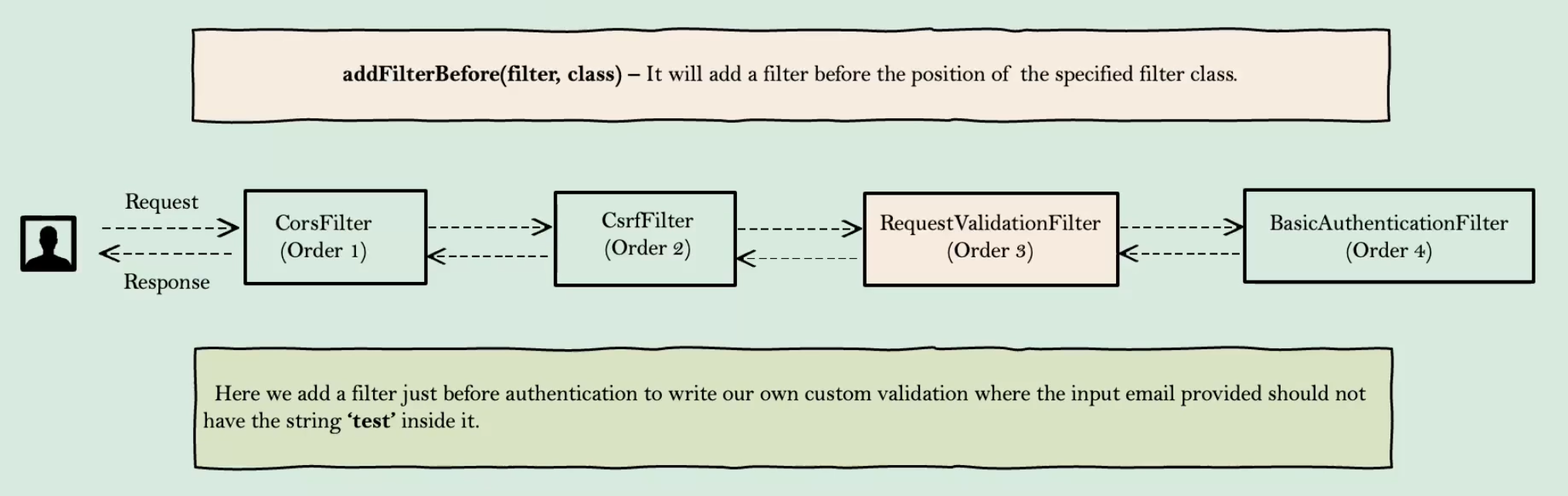
public class RequestValidationBeforeFilter implements Filter {

    // Basic 인증 스키마를 나타내는 상수
    public static final String AUTHENTICATION_SCHEME_BASIC = "Basic";
    // 기본 인코딩 캐릭터셋을 설정
    private Charset credentialsCharset = StandardCharsets.UTF_8;

    @Override
    public void doFilter(ServletRequest request, ServletResponse response, FilterChain chain) throws IOException, ServletException {
        // HTTP 요청과 응답 객체로 캐스팅
        HttpServletRequest req = (HttpServletRequest) request;
        HttpServletResponse res = (HttpServletResponse) response;

        // 요청 헤더에서 Authorization 헤더 값을 가져옴
        String header = req.getHeader(AUTHORIZATION);

        if (header != null) { // Authorization 헤더가 존재할 경우
            header = header.trim(); // 헤더 값의 앞뒤 공백을 제거
            // 헤더 값이 Basic 인증 스키마로 시작하는지 확인
            if (StringUtils.startsWithIgnoreCase(header, AUTHENTICATION_SCHEME_BASIC)) {
                // Basic 인증 스키마 이후의 토큰 부분을 Base64로 디코딩
                byte[] base64Token = header.substring(6).getBytes(StandardCharsets.UTF_8);
                byte[] decoded;
                try {
                    decoded = Base64.getDecoder().decode(base64Token); // Base64 디코딩
                    String token = new String(decoded, credentialsCharset); // 디코딩된 바이트 배열을 문자열로 변환
                    int delim = token.indexOf(":"); // 사용자 이름과 비밀번호를 구분하는 콜론(:) 위치 찾기
                    if (delim == -1) { // 콜론이 없으면 유효하지 않은 토큰으로 간주
                        throw new BadCredentialsException("Invalid basic authentication token");
                    }
                    String email = token.substring(0, delim); // 콜론 이전의 부분은 사용자 이름(이메일)
                    if (email.toLowerCase().contains("test")) { // 이메일에 'test'가 포함되어 있으면
                        res.setStatus(HttpServletResponse.SC_BAD_REQUEST); // HTTP 400 상태 코드를 설정
                        return; // 요청을 더 이상 처리하지 않고 종료
                    }
                } catch (IllegalArgumentException e) { // Base64 디코딩 중 예외가 발생한 경우
                    throw new BadCredentialsException("Failed to decode basic authentication token");
                }
            }
        }
        // 필터 체인의 다음 필터로 요청을 전달
        chain.doFilter(request, response);
    }

    @Override
    public void init(FilterConfig filterConfig) throws ServletException {
        // 필터 초기화 로직 (필요한 경우)
        // 예: 필터가 사용하는 리소스를 초기화하거나 설정을 로드
    }

    @Override
    public void destroy() {
        // 필터 종료 로직 (필요한 경우)
        // 예: 필터가 사용하는 리소스를 해제하거나 정리
    }
}
Vue.js에서 Spring Security의 Basic Authentication을 사용하여 요청을 보내려면, Axios를 사용하여 요청 헤더에 인증 정보를 포함할 수 있습니다. 아래는 Vue.js에서 Axios를 사용하여 Basic Authentication을 포함한 요청을 보내는 방법에 대한 예제입니다.
// src/axios.js
import axios from 'axios';
import Base64 from 'base-64';

const username = 'your-username'; // 사용자 이름
const password = 'your-password'; // 비밀번호
const basicAuth = 'Basic ' + Base64.encode(username + ':' + password);

const axiosInstance = axios.create({
  baseURL: 'http://localhost:8080', // 백엔드 API의 기본 URL
  headers: {
    'Authorization': basicAuth,
    'Content-Type': 'application/json'
  }
});

export default axiosInstance;

package com.example.loans_domain.config;

import jakarta.servlet.*;
import org.springframework.security.core.Authentication;
import org.springframework.security.core.context.SecurityContextHolder;

import java.io.IOException;
import java.util.logging.Logger;

public class AuthoritiesLoggingAfterFilter implements Filter {

    private final Logger LOG = Logger.getLogger(AuthoritiesLoggingAfterFilter.class.getName());

    @Override
    public void doFilter(ServletRequest request, ServletResponse response, FilterChain chain) throws IOException, ServletException {
        Authentication authentication = SecurityContextHolder.getContext().getAuthentication();

        if(null != authentication){
            LOG.info("User" + authentication.getPrincipal() + " is successfully authenticated and"
                    + " has the authorities " + authentication.getAuthorities().toString());
        }
        chain.doFilter(request,response);
    }
}
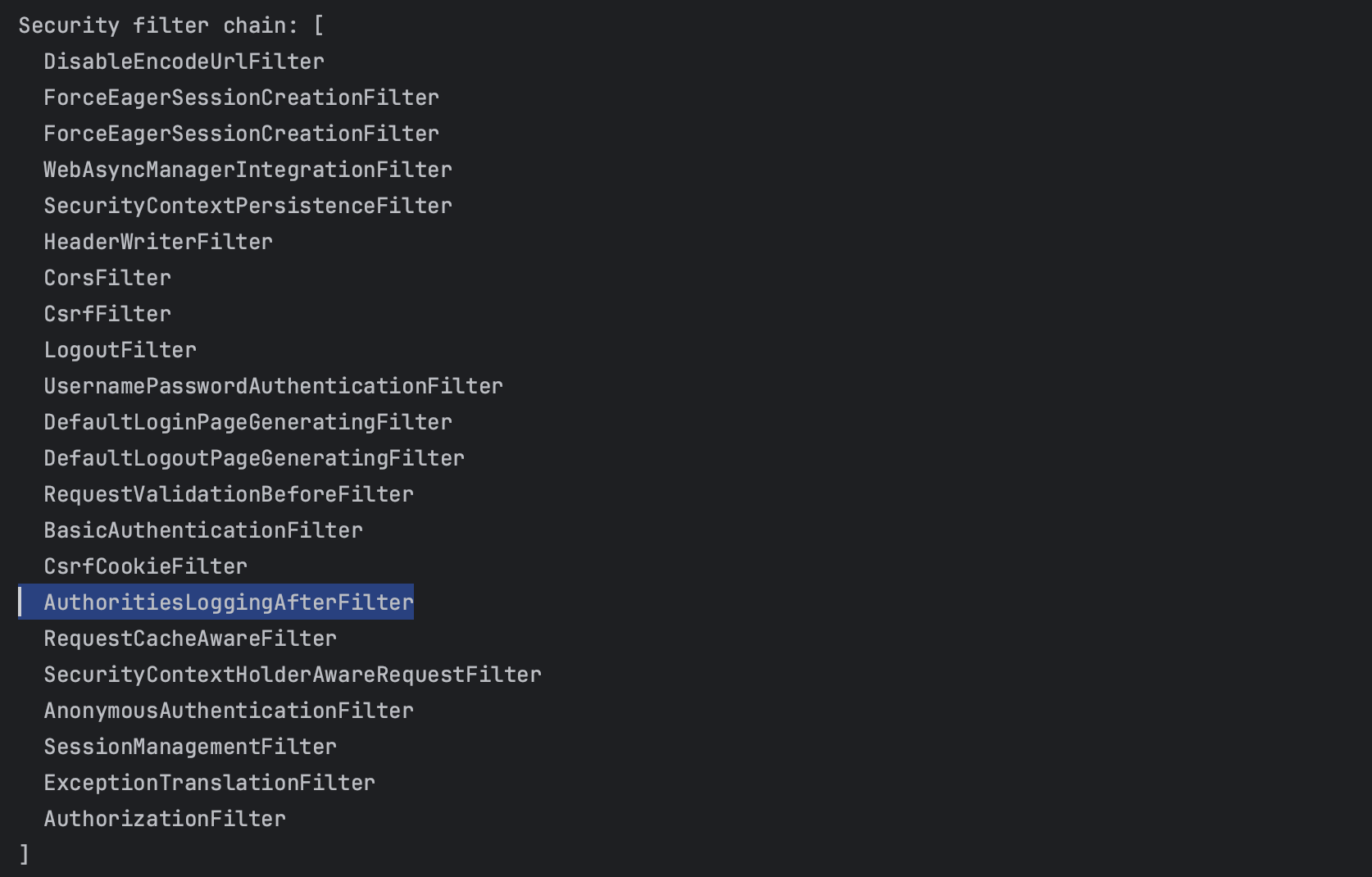
- SecurityContextHolder에서 인증 정보 가져오기:
- SecurityContextHolder.getContext().getAuthentication()을 통해 현재 사용자의 인증 정보를 가져옵니다.
- 인증 정보가 null이 아닌 경우:
- 사용자가 인증된 상태임을 의미합니다.
- 인증된 사용자 정보와 권한을 로그에 기록합니다.
- 로그 기록:
- Logger 객체를 사용하여 인증된 사용자와 그 사용자가 가진 권한들을 로그로 출력합니다.
- 로그 메시지에는 사용자의 주체(Principal)와 권한 목록(Authorities)이 포함됩니다.
- 다음 필터로 요청 전달:
- chain.doFilter(request, response)를 호출하여 요청이 다음 필터로 전달되도록 합니다.
사용 목적
- 디버깅: 인증 과정에서 문제가 발생했을 때, 어떤 사용자가 인증되었고 어떤 권한을 가지고 있는지 확인할 수 있습니다.
- 감사: 보안 로그를 통해 누가 언제 시스템에 접근했는지 추적할 수 있습니다.
- 모니터링: 시스템에 접근하는 사용자와 그들의 권한을 모니터링하여 보안 상태를 점검할 수 있습니다.
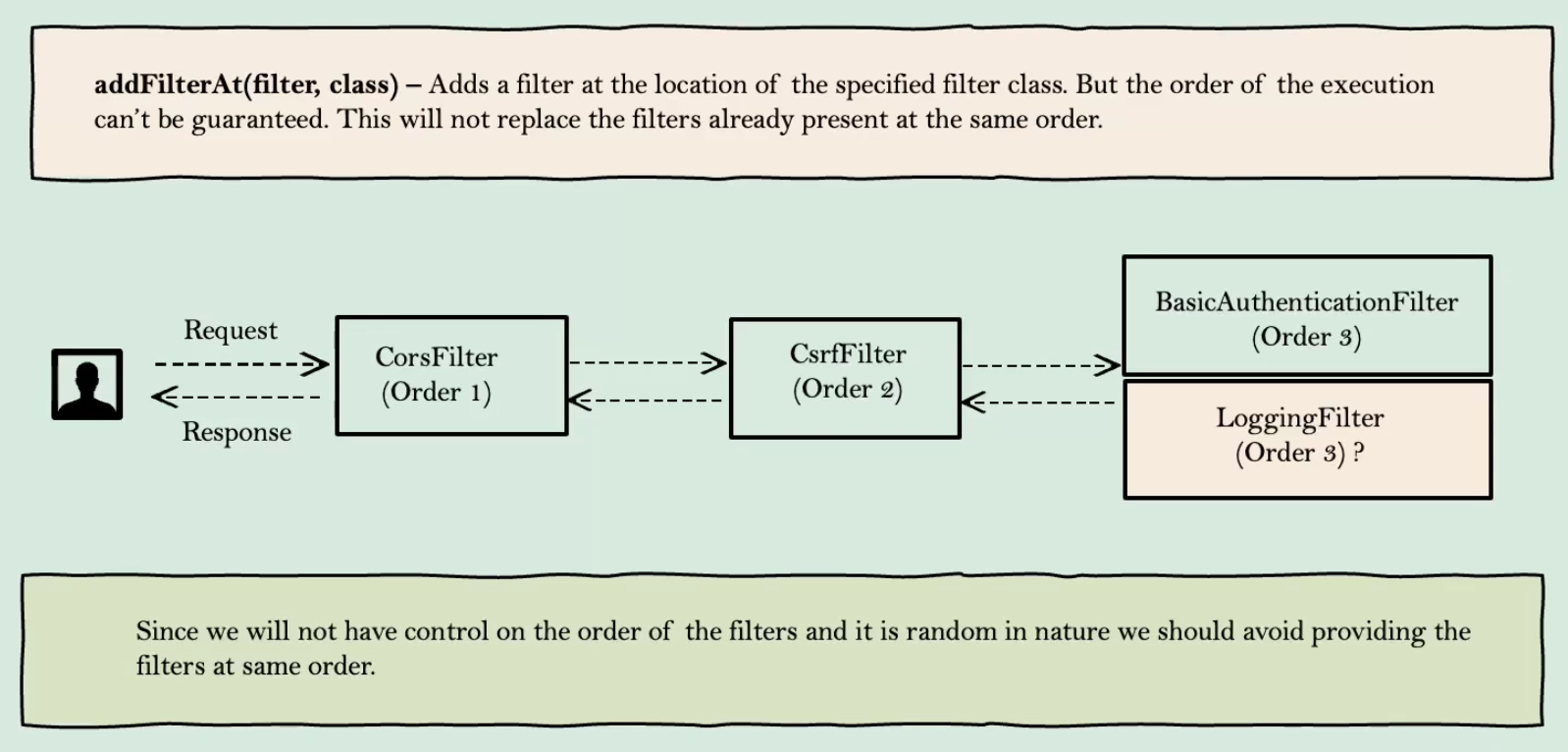
addFilterAt 사용하면 Spring Security의 특정 내부 필터와 동일한 위치에 커스텀 필터를 구성할 수 있습니다. 하지만 이 방법은 매우 조심스럽게 사용해야 합니다. 왜냐하면 동일한 위치에 여러 필터가 있을 경우 어떤 필터가 먼저 실행될지 예측할 수 없기 때문입니다. 따라서 비즈니스 로직에 부작용이 없도록 작성해야 합니다.
package com.booktory.booktoryserver.Users.filter;

import jakarta.servlet.Filter;
import jakarta.servlet.FilterChain;
import jakarta.servlet.FilterConfig;
import jakarta.servlet.ServletException;
import jakarta.servlet.ServletRequest;
import jakarta.servlet.ServletResponse;
import org.springframework.security.core.Authentication;
import org.springframework.security.core.context.SecurityContextHolder;

import java.io.IOException;
import java.util.logging.Logger;

public class AuthoritiesLoggingAtFilter implements Filter {

    private final Logger LOG = Logger.getLogger(AuthoritiesLoggingAtFilter.class.getName());

    @Override
    public void doFilter(ServletRequest request, ServletResponse response, FilterChain chain) throws IOException, ServletException {
        Authentication authentication = SecurityContextHolder.getContext().getAuthentication();

        if (authentication != null) {
            LOG.info("User " + authentication.getPrincipal() + " is successfully authenticated and"
                    + " has the authorities " + authentication.getAuthorities().toString());
        }
        LOG.info("Authentication is in progress");
        chain.doFilter(request, response);
    }

    @Override
    public void init(FilterConfig filterConfig) throws ServletException {
        // 필터 초기화 로직
    }

    @Override
    public void destroy() {
        // 필터 종료 로직
    }
}
package com.booktory.booktoryserver.config;

import com.booktory.booktoryserver.Users.filter.AuthoritiesLoggingAtFilter;
import org.springframework.context.annotation.Bean;
import org.springframework.context.annotation.Configuration;
import org.springframework.security.config.annotation.web.builders.HttpSecurity;
import org.springframework.security.config.annotation.web.configuration.EnableWebSecurity;
import org.springframework.security.config.annotation.web.configuration.WebSecurityConfigurerAdapter;
import org.springframework.security.crypto.bcrypt.BCryptPasswordEncoder;
import org.springframework.security.crypto.password.PasswordEncoder;

@EnableWebSecurity
@Configuration
public class SecurityConfig extends WebSecurityConfigurerAdapter {

    @Override
    protected void configure(HttpSecurity http) throws Exception {
        http.addFilterAt(new AuthoritiesLoggingAtFilter(), BasicAuthenticationFilter.class)
            .authorizeRequests()
                .anyRequest().authenticated()
            .and()
            .formLogin();
    }

    @Bean
    public PasswordEncoder passwordEncoder() {
        return new BCryptPasswordEncoder();
    }
}
addFilterAt 메서드를 사용하여 커스텀 필터를 Spring Security 필터 체인에 추가하는 방법을 배웠습니다. 이 방법을 사용하면 특정 내부 필터와 동일한 위치에 필터를 추가할 수 있지만, 실행 순서가 랜덤이므로 주의가 필요합니다.